Apple Watch Health Features Explained: Heart Rate, ECG, Sleep Tracking and More
The Apple Watch started life in 2015 as a stylish way to read notifications on your wrist. Over the years it has quietly turned into something much more serious: a wearable health device that tracks your heart, your sleep, your movement, your breathing and more, and that can alert you when something looks unusual. Some of its features have been cleared by regulators such as the US Food and Drug Administration, and there are well-known stories of people who discovered a heart rhythm problem because their watch told them to see a doctor.
But the Apple Watch also comes with a lot of health-related buzzwords. What does an irregular rhythm notification actually do? How is the ECG app different from the heart rate sensor? Can a watch really tell you how well you slept? And which features work on which models?
This guide explains the major Apple Watch health features in plain language: how they work, what they can and cannot tell you, and how to get the most out of them. Features, availability and model support change with each software release and differ by country, so always check Apple’s website for the details that apply to your watch and region.
Important: The Apple Watch is not a substitute for a doctor. Nothing in this article is medical advice. If you have symptoms such as chest pain, shortness of breath, fainting or a racing heartbeat, seek medical care rather than relying on a watch.
How the Apple Watch Measures Your Health
Before looking at individual features, it helps to understand the hardware behind them. The Apple Watch collects data from several sensors.
Optical heart sensor. On the back of the watch is a cluster of LEDs and photodiodes. The LEDs shine light into your skin, and the photodiodes measure how much light is reflected back. Because blood absorbs green light, the amount reflected changes with each pulse of blood flow. This technique is called photoplethysmography, or PPG. From it, the watch calculates your heart rate and many related measurements.
Electrical heart sensor. On newer watches, the Digital Crown and the back crystal contain electrodes. When you touch the crown with a finger, you complete a circuit across your body, and the watch can record the heart’s electrical signal. This is what powers the ECG app.
Accelerometer and gyroscope. These motion sensors detect movement, steps, workouts, falls and even tiny movements during sleep.
Temperature sensors. Newer models have sensors that measure wrist skin temperature, mainly during sleep.
Other sensors. Depending on the model, the watch also includes a barometric altimeter, a compass, GPS, an ambient light sensor, and a microphone used for features such as noise level measurement.
All of this data flows into the Health app on your iPhone, where you can see trends, set up sharing and keep everything in one place.
Heart Rate Monitoring
Heart rate is the foundation of most Apple Watch health features, and it is probably the one you will use most often.
What it measures
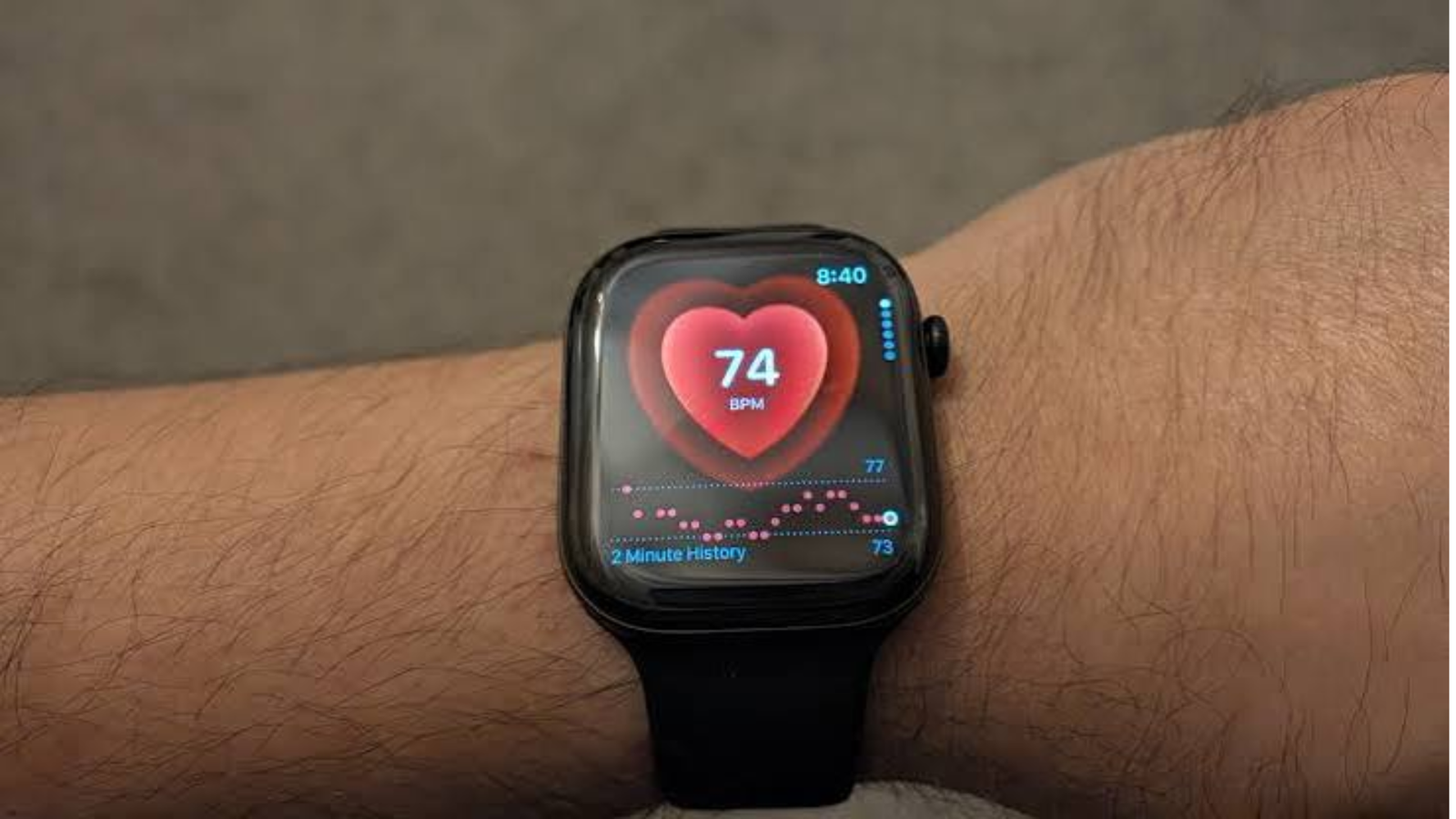
The watch measures your heart rate throughout the day, including at rest, while walking, during workouts and during recovery. In the Heart Rate app you can see your current reading, your resting rate, your walking average and your range over the day.
The watch records readings in the background at regular intervals when you are still, and more frequently during workouts. If you want a reading right now, you can open the app and wait a few seconds.
Why resting heart rate matters
Your resting heart rate is the number of beats per minute when you are calm and not moving. For most adults it typically falls between 60 and 100 beats per minute, though fit people often have lower rates. Over time, a gradually falling resting heart rate can reflect improving fitness, while an unexplained rise may be linked to stress, illness, poor sleep, dehydration or other factors. The watch tracks the trend so you can spot changes that a single reading would not show.
Heart rate variability
Heart rate variability, or HRV, measures the small differences in time between successive heartbeats. A healthy heart does not beat like a metronome, and these natural variations can reflect how your nervous system is balancing stress and recovery. The Apple Watch records HRV periodically, and many people watch the trend alongside sleep and training. HRV varies a great deal from person to person, so comparing yourself to others is not useful. The meaningful comparison is with your own baseline.
High and low heart rate notifications
You can set the watch to alert you if your heart rate stays above or below a chosen threshold while you appear to be inactive for about ten minutes. For example, you might set an alert for a rate above 120 or below 40 beats per minute. This can be a helpful early warning, though a medical professional should help you choose thresholds if you have a known heart condition.
Cardio Recovery and Cardio Fitness
Cardio Recovery measures how quickly your heart rate falls after intense exercise. A faster drop is generally associated with better cardiovascular fitness.
Cardio Fitness, often called VO2 max, is an estimate of how efficiently your body uses oxygen during exercise. The watch estimates it from outdoor walks, runs and hikes using heart rate and motion data. It is an estimate, not a laboratory measurement, but it is useful for tracking your own progress. If your Cardio Fitness is low for your age and sex, the watch can send a notification.
How accurate is it?
Optical heart rate sensors are generally good at resting and steady exercise such as running or cycling at a consistent pace. They can be less accurate during high-intensity intervals, weightlifting or activities with lots of wrist movement. A loose strap, sweat, dark tattoos and cold weather can also affect readings. For best results, wear the watch snugly, a finger-width above the wrist bone, and consider a chest strap for training where precision matters.
Irregular Rhythm Notifications and AFib History
One of the most talked-about Apple Watch features is its ability to look for signs of atrial fibrillation, or AFib.
What is AFib?
Atrial fibrillation is a common heart rhythm disorder in which the upper chambers of the heart beat irregularly and often too fast. It can increase the risk of stroke and other complications. Many people with AFib have no symptoms, which is why it can go undetected for a long time.
How the notification works
When enabled, the watch periodically checks your pulse rhythm in the background, mostly when you are still. If it detects signs consistent with AFib on several readings, it sends an irregular rhythm notification. This is not a diagnosis. It is a prompt to talk to a doctor, who can confirm or rule out a problem using proper medical tests.
These notifications are intended for people aged 22 and over who have not been diagnosed with AFib. The feature is available in many, but not all, countries.
AFib History
If you have been diagnosed with AFib, the AFib History feature estimates how often your heart shows signs of AFib over a week, shown as a percentage of the time. It also helps you see what may be influencing it, such as sleep, alcohol or exercise, by letting you log lifestyle factors. This can be valuable information to bring to appointments.
The ECG App
The ECG app is probably the most impressive health feature on the watch.
What it is
An electrocardiogram records the electrical activity of the heart. Hospitals use multi-lead machines with many electrodes. The Apple Watch records a single-lead ECG, comparable to what doctors call Lead I, by measuring the electrical signal between your two arms when you touch the Digital Crown with the finger of the opposite hand.
How to take a reading
- Open the ECG app on your watch.
- Rest your arms on a table or your lap.
- Hold a finger from your other hand on the Digital Crown without pressing.
- Stay still for 30 seconds while the watch records.
- See the result and, if you like, save a PDF for your doctor from the Health app.
What the results mean
The watch classifies the recording as sinus rhythm, atrial fibrillation, high or low heart rate, or inconclusive. Sinus rhythm means your heart is beating in a uniform pattern, which is normal, but it does not mean there is nothing wrong with your heart. Atrial fibrillation means the watch detected an irregular pattern consistent with AFib. Inconclusive means the recording could not be classified, often because of movement or poor contact.
What it cannot do
It is crucial to understand the limits. The ECG app cannot detect a heart attack, blood clots, stroke, high blood pressure, high cholesterol, heart failure or many other heart conditions. If you have chest pain or other symptoms, a normal watch ECG should not reassure you. Call emergency services or see a doctor.
The ECG feature is available on Apple Watch Series 4 and later, apart from some regional exceptions, and it requires clearance or approval in each country, so it is not available everywhere.
Blood Oxygen
Blood oxygen, also called SpO2, measures the percentage of oxygen carried by red blood cells. The Apple Watch estimates it using red and infrared light and sensors on the back of the watch.
The feature was introduced on the Series 6 and has been available on later models, though availability has varied by country and, in the United States, has been affected by patent disputes that led Apple to change how the feature works on watches sold there. Because of this, you should check what your particular watch and region support.
For most healthy people at sea level, readings are typically in the mid to high 90s. The measurement can be affected by movement, skin tone, tattoos, a loose fit and cold temperatures. Apple states that blood oxygen readings are intended for general fitness and wellness purposes and are not intended for medical use. If you have lung or heart conditions, or if you feel breathless, speak to a doctor rather than relying on the watch.
Sleep Tracking
For many people, sleep tracking is the reason they wear the watch overnight.
What the watch tracks
The Sleep app uses motion, heart rate and other signals to estimate how long you slept and which stages you passed through. It reports time in bed, time asleep, and the approximate time spent in awake, REM, core and deep sleep. You can also see your heart rate and respiratory rate during sleep, and your wrist temperature on supported models.
In recent versions of watchOS, Apple also introduced a sleep score, which summarizes factors such as duration, bedtime consistency and interruptions into a single number. Availability depends on the watch model and software version.
Sleep stages
- Awake: Periods when you are up or restless.
- REM: Rapid eye movement sleep, associated with dreaming and memory processing.
- Core: Light to moderate sleep that makes up much of the night.
- Deep: The most restorative stage, linked to physical recovery.
It is important to be realistic about accuracy. The only truly reliable way to measure sleep stages is a sleep study that records brain activity. Wearables estimate stages indirectly from movement and heart signals. Studies of consumer devices generally find they do well at distinguishing sleep from wakefulness and are less reliable for individual stages. Treat the stage breakdown as an approximation and pay more attention to trends over weeks than a single night’s numbers.
Sleep schedules and Sleep Focus
The watch lets you set a sleep goal and bedtime schedule, and it will remind you to wind down. Sleep Focus silences notifications, dims the screen and can turn on a bedtime routine. A smart alarm and gentle wake-up haptics are also available. These behavioral tools may help more than the data itself, because consistent bedtimes are one of the most effective habits for better sleep.
Sleep apnea notifications
Some newer watches can notify you of signs of possible sleep apnea, a condition in which breathing repeatedly stops and starts during sleep. The feature uses the accelerometer to detect small movements linked to breathing disturbances over a period of time and can notify you if the pattern is consistent with moderate to severe sleep apnea. It has received regulatory clearance in various countries and is not a diagnosis. If you receive a notification, speak to a doctor, who may arrange a sleep study.
Charging and battery considerations
To track sleep you need to wear the watch overnight, which means you need to charge it at another time. Many people charge during a morning routine or while showering. Modern models have fast charging, so even a short top-up before bed can provide enough power for the night.
Wrist Temperature and Cycle Tracking
Newer Apple Watch models measure skin temperature at the wrist during sleep. Because the reading is taken while you are still and in a stable environment, the watch can track small changes relative to your own baseline.
In the Cycle Tracking app, this temperature data can be used to estimate when ovulation may have occurred, retrospectively, and to improve period predictions. It is not designed to be used as a contraceptive or to confirm a pregnancy, and Apple notes that it is not a method of birth control. The watch can also notify you of irregular, infrequent or prolonged cycles, or of persistent spotting, if you log your cycle data. These can be signs worth discussing with a healthcare provider.
Because the temperature feature relies on a night of sleep, it may need several nights of data before producing results.
The Vitals App
In recent versions of watchOS, the Vitals app gathers key overnight measurements in one place, such as heart rate, heart rate variability, respiratory rate, wrist temperature and, where supported, blood oxygen. It shows whether each value falls within your typical range, and it can notify you when several measurements are outside your usual range at once. That combination can sometimes be a sign of illness, stress, alcohol use or changes in medication, though it can also be caused by many harmless things. It is best viewed as a prompt to pay attention to how you feel.
Hypertension Notifications
High blood pressure is one of the most common and least noticed health problems, since it often causes no symptoms. Apple has introduced hypertension notifications on supported watches, which analyze how your blood vessels respond to your heartbeat over a period of days, using the optical sensor.
It is important to understand what this feature does. It does not give you a blood pressure reading, and it does not replace a blood pressure cuff. It looks for patterns that may suggest chronic hypertension and sends a notification if it detects them. You would then be encouraged to confirm with a proper blood pressure measurement and a doctor. The feature depends on regulatory clearance, model support and your country, so availability is limited.
Activity Rings, Workouts and Training Load
Not every health feature is about disease detection. The Apple Watch is also built to encourage movement.
The three Activity rings, Move, Exercise and Stand, are simple but effective. The Move ring tracks active calories, the Exercise ring tracks minutes of brisk activity, and the Stand ring prompts you to stand and move for at least one minute in 12 different hours of the day. The design uses streaks, awards and sharing with friends to keep you motivated.
The Workout app supports a long list of activities, including running, walking, cycling, swimming, hiking, yoga and strength training. It provides real-time metrics such as pace, heart rate zones, distance and elevation. Newer versions include a Training Load feature that compares your recent effort to your longer-term average, which helps you see whether you are ramping up too quickly or not training enough. More advanced models have additional features for runners, swimmers and outdoor adventurers.
Safety Features: Fall Detection, Crash Detection and Emergency SOS
Some of the most valuable Apple Watch features are the ones you hope never to use.
Fall detection. If the watch detects a hard fall and then no movement, it can offer to call emergency services, and if you do not respond, it can call automatically and notify your emergency contacts. It is turned on by default for people aged 55 or over and can be switched on for others in settings.
Crash detection. On supported models, the watch can detect a severe car crash using its sensors and offer to call emergency services.
Emergency SOS. Pressing and holding the side button lets you call emergency services quickly, and on cellular models it works even without your iPhone nearby.
Medical ID. You can store your medical conditions, allergies, medications and emergency contacts so first responders can see them.
These features are not perfect. They can trigger false alarms during vigorous activity, and they cannot detect every incident. But they have been credited with helping people in real emergencies.
Mindfulness, Mental Health and Medications
The Mindfulness app guides short breathing and reflection sessions, and the watch can also record your state of mind through simple daily check-ins. Over time, the Health app can show patterns related to your mood and what influences it. In some regions, you can also complete standard questionnaires about anxiety and depression and share the results with your doctor.
The Medications feature lets you set up reminders for medicines and supplements, log doses, and receive notifications about potential interactions. This can be especially useful for people who take several medicines or forget doses.
The Noise feature measures environmental sound levels and warns you if you are exposed to loud sound for a long time, which can contribute to hearing loss. A related feature on compatible headphones can monitor how loudly you listen.
Mobility, Balance and Walking Steadiness
As we get older, balance and walking ability become important health indicators. The Apple Watch and iPhone can estimate metrics such as walking speed, step length, double support time and walking asymmetry, and can give a Walking Steadiness rating that reflects your risk of falling. If your steadiness is low, the Health app can send a notification and recommend exercises. These tools are especially relevant for older adults and for family members who want to keep an eye on their relatives’ wellbeing.
Privacy and Sharing of Health Data
Health data is among the most sensitive information about you. Apple stores Health app data on your iPhone, and it can be encrypted and synced through iCloud if you choose. You control which apps can read or write health data, and you can review and change those permissions at any time.
The Health app also allows you to share selected data with family members or caregivers, and to share information with your doctor in some healthcare systems. You can choose exactly which categories to share and stop sharing whenever you like.
If privacy is a concern, review the permissions given to third-party apps, and consider which health data you really want in the cloud.
Which Apple Watch Models Support Which Features?
Not all features work on all watches, and it can be confusing. As a general guide, though specifics change with each release:
- Older models (such as Series 3 and earlier): Basic heart rate, activity tracking and fall detection on some versions, but limited newer health features and often no longer receiving updates.
- Series 4 and later: ECG app support, irregular rhythm notifications and improved fall detection.
- Series 6 and later: Blood oxygen measurement where available.
- Series 8 and later: Wrist temperature sensing, cycle tracking enhancements and crash detection.
- Newer Series and Ultra models: Sleep apnea notifications, hypertension notifications and additional features, depending on the model and software version.
- Apple Watch SE: Many core features, but typically without the ECG app, blood oxygen and some of the newest sensors.
Because this changes often, check Apple’s feature availability page for your country and exact model before buying a watch for a specific health feature.
Limitations and Common Misunderstandings
It is easy to expect too much from a smartwatch. A few reminders can keep your expectations realistic.
It is a screening and awareness tool, not a diagnostic device. The watch can flag patterns that deserve attention, but only a clinician can diagnose a condition.
A normal reading is not a clean bill of health. The ECG app is only looking for a small number of specific conditions.
False alarms and missed events happen. No sensor is perfect, and some people experience unnecessary notifications while others may miss real problems.
Numbers can cause anxiety. For some people, constant monitoring leads to worry or obsession over sleep scores and heart rate. If tracking makes you more anxious, it is reasonable to turn off some notifications or take a break.
Skin tone, tattoos and fit matter. Optical sensors can be affected by many factors, so results will vary between individuals.
Regulatory approval varies by country. A feature available in one country may be missing in another.
Tips for Getting the Most Out of Your Apple Watch
- Wear it correctly. A snug but comfortable fit, above the wrist bone, improves sensor accuracy.
- Keep the sensors clean. Wipe the back of the watch regularly so sweat and dirt do not interfere.
- Set up your Health profile. Accurate age, height, weight and sex information improves calorie and fitness estimates.
- Enable the notifications that matter to you. Turn on the irregular rhythm and heart rate alerts if appropriate, and disable others if they overwhelm you.
- Look at trends, not individual numbers. Weekly and monthly patterns are far more meaningful than a single night or workout.
- Wear it to bed if you want sleep data. And find a charging routine that fits your day.
- Share data with your doctor. Export ECG recordings or health summaries when you have an appointment.
- Keep software updated. New health features and improvements usually arrive through watchOS updates.
- Set up Medical ID and emergency contacts. It takes a minute and could be invaluable.
Frequently Asked Questions
Can the Apple Watch detect a heart attack? No. The watch can detect some rhythm problems, but it cannot detect a heart attack. If you suspect one, call emergency services immediately.
Is the ECG on the Apple Watch as good as a hospital ECG? No. It records a single lead for 30 seconds, while hospital ECGs use multiple leads and give a much more complete picture. It is cleared for detecting signs of AFib, not for diagnosing other conditions.
Do I need an iPhone to use the Apple Watch? Yes. The watch needs a paired iPhone for setup and for the Health app.
How accurate is the sleep tracking? It is reasonably good at estimating total sleep time and less certain about individual stages. It is best for tracking trends.
Can I use the watch to measure blood pressure? Not directly. Some models offer hypertension notifications, which look for patterns but do not provide a blood pressure reading.
Does wearing the watch every night affect battery life? You will need to charge during the day, but modern watches charge quickly, and a short charge is often enough.
Is it worth upgrading for health features? It depends on which features matter to you. If you want ECG, temperature sensing or the newer sleep and cardiovascular notifications, a newer model is worth considering. If you mainly want basic activity tracking, an older or SE model may be enough.
Final Thoughts
The Apple Watch has grown into one of the most capable consumer health devices available. Heart rate tracking, irregular rhythm notifications, ECG, sleep analysis, temperature sensing, fall detection and a growing set of wellness tools give you a window into your body that was once available only through clinics and specialist equipment.
But the most important thing to remember is what it is and is not. It is a convenient, always-on tool that can encourage healthier habits, show you useful trends and occasionally flag something that deserves attention. It is not a doctor, and it should not replace regular check-ups or professional advice.
Used sensibly, the Apple Watch can help you move more, sleep better and catch potential problems earlier. Choose the model that supports the features you care about, learn what each number really means, and use the data as a conversation starter with your healthcare provider rather than a final answer.